


Lowes Foods
4.4295.00 Reviews
App Specs
- Version
- 1.1.43
- Updated On
- License
- Free
- Downloads
- 100,000+
- Developer
- Lowes Foods, LLC.
- Categories
- Food & Drink
- Platform
- Android
Screenshots
 Analysis by AppCompare
I found Lowes Foods most useful when I treated it as a connected shopping companion rather than a complete replacement for every grocery task. The app puts the Lowes Foods experience on a phone, which is especially handy when I am planning a trip, checking details while moving through a store, or trying to make a decision without opening a desktop browser. It is a free Food & Drink app from Lowes Foods, LLC., and its focus is practical: helping shoppers keep the retailer close at hand.
That simplicity is part of its appeal. I do not need to learn a complicated system before getting value from it. At the same time, the app depends on timely communication with online services for much of its usefulness, so the quality of my connection affects how smooth the experience feels. When the network is responsive, the app can make a routine grocery run more organized. When the connection is weak or interrupted, I have to be more patient and keep a backup plan.
How Lowes Foods fits into a connected shopping routine
I find a connected shopping routine works best when each tool has a clear job: I use Lowes Foods for retailer-specific checks and keep a simple note for anything I cannot afford to forget. That handoff avoids making one phone screen responsible for the whole trip, especially when reception is unreliable or several people are contributing to the list. From there, it helps to look at how I move between planning at home and decisions in the store.
The app is most useful before and during a store visit
My favorite way to use Lowes Foods is before leaving home. Grocery shopping becomes less stressful when I can settle basic decisions in advance instead of standing in an aisle trying to remember what I intended to buy. I use the phone as a small planning screen, then keep it available for quick checks while I shop. That workflow is more natural than sitting at a computer because the device travels with me from the kitchen to the car and into the store.
The important point is that this is not an app I open for entertainment or long browsing sessions. Its value comes from short, purposeful visits. I check something, make a decision, and return to shopping. That makes the interface feel worthwhile even when I spend only a few minutes inside it. Shoppers who prefer a focused tool for their Lowes Foods trips will probably appreciate that directness more than people looking for a broad recipe or meal-planning platform.
Connectivity shapes those short visits. Information has to load when I request it, and any account-related or store-related interaction may require a working connection. At home, that is rarely a concern. In a busy store, however, mobile reception can vary, and a crowded network may turn a quick check into a pause. I recommend opening the app before entering the store when I already know I will need it, rather than waiting until the exact moment I am standing in an aisle.
What I do when the network is reliable
With a stable connection, the app feels like a useful bridge between planning and shopping. I can move from a thought such as “I need groceries tonight” to a more deliberate visit without switching between several unrelated tools. That reduction in friction matters most on ordinary weekdays, when I have limited time and do not want to build a detailed plan from scratch.
Worth Reading Before You Choose

EA SPORTS FC Mobile 26 Is a Bigger Football Game, but It Takes Time

Flipboard Shows What News Apps Must Do Beyond the Feed

Switching to Android Auto Means Rethinking Your Driving Routine

Google Calendar Makes a Crowded Week Easier to Manage

Ludo King Makes the Most of the Minutes Between Plans

Baby Panda World Brings Quick Play to Modern Phones, but Its Game Library Feels Busy
A realistic example is an after-work trip. I might open the app while commuting as a passenger, review what I need to handle, and then use it again once I reach the store. If the connection remains steady, the phone supports the whole sequence: preparation first, quick reference second, and a final check before I leave. The benefit is not dramatic, but it is exactly the kind of small improvement that can make a recurring chore feel more manageable.
I also find connected access useful when plans change. A forgotten item, an unexpected dinner idea, or a last-minute store decision can send me back into the app. That flexibility is one reason I prefer it to relying only on a paper note. A paper list is dependable for what I wrote down, but it cannot respond to a change in context. The app is better when I need current interaction rather than a fixed reminder.
Mobile use is convenient, but the phone is not always the ideal screen
The phone format works well for quick glances, especially when I am already carrying the device through the store. I can use one hand, keep the session brief, and avoid printing anything. For a larger planning session, though, I still prefer a bigger screen or a simple written list. A phone is excellent for immediate decisions, but less comfortable when I want to compare many details at once or spend a long time organizing a full household shop.
This is an important trade-off. Lowes Foods is convenient because it is mobile, yet mobile convenience also encourages rushed use. If I am walking quickly, dealing with children, or carrying several bags, I may not want to stop and navigate through multiple screens. My practical tip is to do the thoughtful part at home and reserve the store visit for confirmation and small adjustments. That keeps the app from becoming another distraction during an already busy trip.
The app is available for devices running Android version six or later, which covers a broad range of older Android phones. That makes it approachable for people who do not replace their phones frequently. Still, I would judge the experience on the actual device I use every day, not only on compatibility. An older phone may open the app successfully but feel slower when several other apps are active or storage is tight. Closing unnecessary apps before shopping can make a modest difference in responsiveness.
What happens when loading fails
The most noticeable weakness in a connected shopping app is not necessarily a missing feature; it is uncertainty when a screen takes too long to respond. If I tap something and receive no immediate feedback, I may not know whether the request is still processing, the connection has dropped, or the action did not register. That uncertainty is inconvenient in a store because I usually want an answer quickly.
My recovery approach is deliberately simple. I wait briefly instead of tapping repeatedly, then check whether the phone still shows a usable connection. If the screen remains stuck, I return to the previous screen and try once more. Repeated tapping can create confusion, especially if the first request eventually completes and the later taps trigger the same action again. When that does not help, I close and reopen the app, then continue with the information I already know rather than allowing one failed request to derail the entire shopping trip.
I also avoid making the app my only source of memory. Before leaving home, I keep the essential items in a basic note or remember the most important parts of the trip. This is not a criticism of Lowes Foods so much as sensible preparation for any service that relies on a live connection. A grocery app should reduce friction, but it should not leave me unable to finish a routine purchase when reception becomes unreliable.
Recovery is easier when I separate essential and optional tasks. If I only need a quick reference, I can move on after one failed attempt. If I am trying to complete a more involved action, I wait until I am somewhere with a stronger signal. This habit prevents me from wasting time in the middle of an aisle and makes the app feel more dependable, even though the surrounding network is outside the app’s control.
Using it without wasting mobile data
Lowes Foods is not an app I need to keep open continuously. That is good news for data-conscious shoppers. I open it for a specific purpose, complete the task, and close it rather than leaving it active throughout the entire trip. This short-session approach is also easier on battery life and helps me pay attention to shopping instead of constantly checking the screen.
At home, I prefer to prepare using Wi-Fi when possible. I can take more time to make decisions, and I am less likely to refresh a page repeatedly because I am standing in a poor-signal area. Once I reach the store, I use mobile data only for the checks that matter. This creates a useful division: planning on a stable connection, quick confirmation while out, and no unnecessary browsing after the task is complete.
Another practical tip is to avoid refreshing simply because a screen feels slow. A slow response may be temporary, and multiple refreshes can consume more data without solving the underlying problem. I wait, verify the connection, and try again only when there is a clear reason. If I know I will be shopping in a location where reception is inconsistent, I prepare the key decisions beforehand instead of expecting the app to deliver every detail at exactly the right moment.
People who are very careful about mobile data may prefer a handwritten list for the main shop and use Lowes Foods only for occasional checks. That hybrid method works well for me. It preserves the app’s convenience without turning every grocery decision into a live online request. The app is most valuable as a supplement to a routine, not as something that must control every step of it.
Who will get the most from it
I would recommend Lowes Foods to regular Lowes Foods shoppers who want their grocery routine on their phone. It is particularly suitable for people who plan at home but need flexibility once they leave, and for households where shopping decisions change during the day. The free price removes an obvious barrier, while the Everyone content rating makes it suitable for a broad household audience.
It can also help someone who dislikes carrying paper lists or switching between a retailer website and a separate note-taking app. Keeping the retailer’s experience in one mobile place feels more natural when the phone is already part of the shopping routine. The app has also built a noticeable user base, with more than one hundred thousand installs and an average rating of 4.4 from around one thousand one hundred ratings. Those figures suggest that many shoppers find the basic concept useful, although they should not replace my own judgment about whether the workflow fits a particular household.
I would be less enthusiastic for someone who wants a universal grocery organizer that works across many supermarket chains. This app is tied to Lowes Foods, so its usefulness depends on shopping there. A person who compares several retailers every week may get more value from a neutral list manager or a broader grocery service. Likewise, shoppers who rarely use a phone in stores may find a paper list faster and less distracting.
It is also not my first choice for a long planning session. A larger screen, spreadsheet, or dedicated household note can be easier when several people are coordinating a large shop. Lowes Foods works best when the goal is to make the retailer experience more accessible, not when I need a complete inventory system for every store, pantry item, and meal in the home.
What the current app details tell me
The app was released on October 5, 2022, and the current version is 1.1.43. That history gives it time to mature beyond a brand-new launch, while the version number also reminds me to keep the app updated when a newer release becomes available through the normal store process. Updates are especially relevant for a connected app because compatibility and server communication can affect everyday reliability.
Lowes Foods, LLC. is the developer, and the app is free to install. I appreciate that the entry point is straightforward: there is no purchase decision required before I can decide whether the workflow suits me. The free model does not automatically make an app perfect, of course. I still judge it by how quickly it helps me complete a grocery task, how gracefully it handles a weak connection, and whether I feel more organized after using it.
For privacy-conscious users, my advice is to review the app’s current permissions and account choices on the device before settling into a routine. I do not assume that every shopper wants the same level of personalization or connected convenience. The right balance depends on how often I shop at Lowes Foods and how comfortable I am using a retailer’s mobile service during ordinary errands.
My verdict on connectivity and everyday value
Lowes Foods is strongest when I use it as a prepared, connected companion rather than my only shopping safety net. A reliable network lets me plan, check, and adjust with less friction, while a weak connection can interrupt the very moments when I want speed. Preparing the important parts at home, limiting mobile sessions, and keeping a basic backup list are small habits that make a noticeable difference.
Compared with a paper list, the app offers more flexibility but less independence from the phone and network. Compared with a general grocery organizer, it offers a more retailer-specific experience but is less useful for shoppers who divide their purchases among many stores. Those trade-offs are clear enough that I can recommend it confidently to the right audience instead of presenting it as a universal solution.
After using it, I see the best fit as a regular Lowes Foods customer who wants convenient mobile access during a normal shopping routine. I would skip it if I rarely shop there, avoid connected services in stores, or need a cross-retailer planning system. For everyone in between, the free app is worth trying, especially if the goal is to make everyday Lowes Foods trips a little easier without turning grocery shopping into a complicated project.
Pros
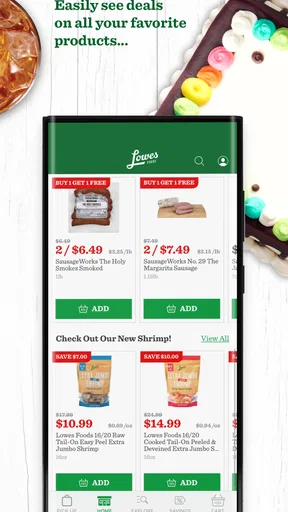
- Easy access to weekly deals and digital coupons
- Store locator helps find nearby Lowe’s Foods locations
- Rewards features can make regular shopping more economical
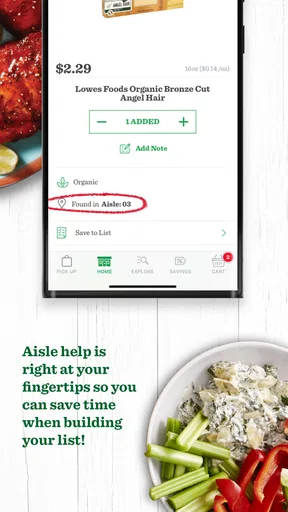
- Useful for checking product availability before visiting
- Supports convenient grocery planning from a mobile device
Cons
- Some features may require location access to work properly
- Digital coupons can have restrictions and expiration dates
- Product availability may not always update in real time
- App performance may vary depending on device and connection
- Not every store service or promotion may be available in the app
FAQs for Lowes Foods
What is the Lowes Foods app used for?
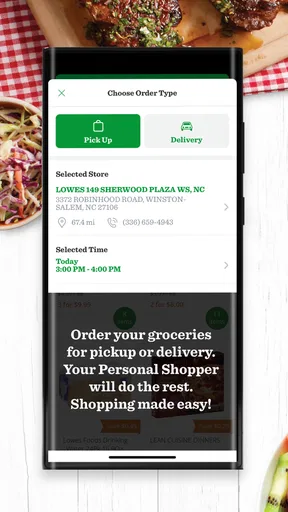
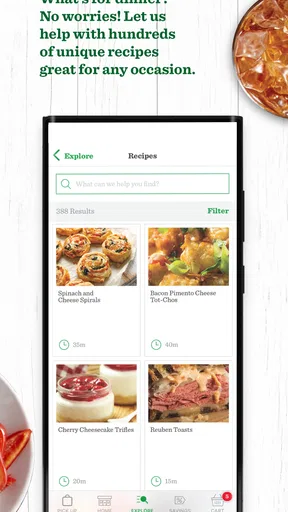
The Lowes Foods app is designed to make grocery shopping more convenient. After exploring it, I found that users can browse products, check weekly specials, create shopping lists, locate nearby stores, and review available services. Depending on your location, the app may also support online ordering, pickup, delivery, digital coupons, and loyalty features through the Lowes Foods to Go experience.
Can I order groceries for pickup or delivery through Lowes Foods?
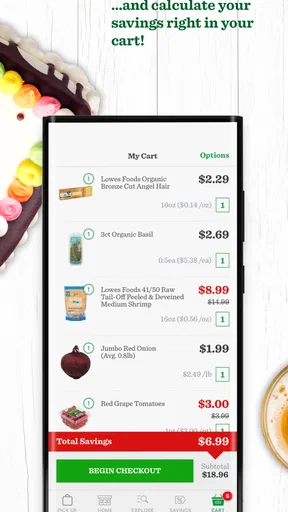
Yes, Lowes Foods may allow customers to place grocery orders for curbside pickup or delivery, although availability depends on the store and your ZIP code. You can add products to your cart, select an available time slot, and review substitutions or fees before checkout. It is a good idea to confirm service coverage in your area before relying on the feature.
Does the Lowes Foods app offer digital coupons or loyalty rewards?
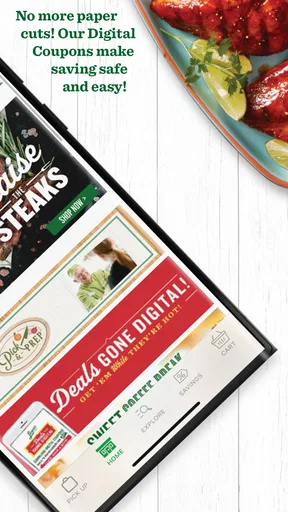
The app can provide access to digital coupons, personalized offers, and loyalty benefits associated with a Lowes Foods account. Offers generally need to be clipped or activated before shopping, then linked to the account or phone number used at checkout. Promotions can change frequently, so users should read expiration dates, product restrictions, and minimum-purchase requirements carefully.
Can I find store information and weekly deals in the app?
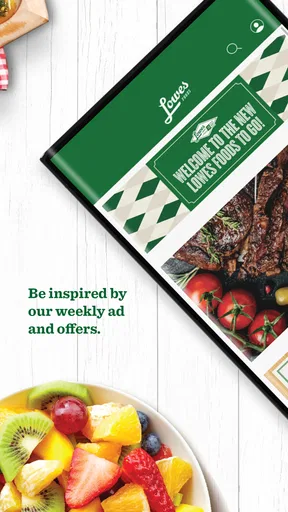
Yes, the Lowes Foods app is useful for checking nearby store details and planning a shopping trip around current promotions. After selecting a preferred location, users can typically view store information, weekly ads, departments, and special offers. Some features may vary between locations, so choosing the correct store is important for accurate pricing and availability.
Is the Lowes Foods app free, and what information does it require?
The Lowes Foods app is generally free to download, although normal mobile data charges may apply. You can browse some information without signing in, but ordering, saving shopping lists, receiving personalized deals, and managing loyalty benefits usually require an account. The app may request details such as your email address, location, and preferred store to provide relevant services.


